We know how important reading is, but if kids don't WANT to read, it's going to become a bigger problem in the face of how this pandemic is changing education. With the learning that has happened remotely, we NEED kids to want to pick up a book for fun, especially in K - 3. Younger readers need lots of experience with reading if they are going to continue to grow as readers, but books at their reading level are hard to find and not always interesting. Often books that are written for younger readers to decode themselves are contrived to have particular sight words and patterns that support emergent readers. I'm not saying that isn't important – it is. It's one of the foundations for learning to read, and it is a necessary step in the reading process. But it's hard to convince kids to get excited about reading a book that does not have an interesting plot. We need them to find pleasure in curling up in a quiet place to enjoy a story whether in the corner of our classroom or in a corner of their home. That means we need to help them find books that are engaging and relevant to them. We, as teachers, can use those decodable sight word readers in guided reading groups and direct instruction as a focus for our teaching point, but we also need to get kids reading for pleasure on their own. People, especially kids, DO judge books by their cover no matter how the saying goes. So it’s time to start updating our classroom libraries! It's time to get rid of outdated books and replace them with stories that resonate with our students today. While there are beautiful, timeless books out there that we need to hang onto, not all books are created equal. As we think about the books we are putting in the hands of kids, we need to be asking:
- is it relevant and appealing to our students?
- is it representative of all people and their family dynamics?
- does it have underlying bias we need to be aware of?
- will our students want to read it?
Here are some new early chapter book series that will have your K - 3 students excited to pick up a book and read! Getting them hooked on a series will give them a go-to place for their next favorite read. And EVERY kid can't wait to read chapter books! These books will help your younger readers identify as readers who can't wait to pick up their next book.
The following links are affiliate links, which means that if you use the link to purchase a book, I do receive a small stipend at no cost you.
Elephant and Piggie
by Mo Willems
The truth is, this is not a new series. And even though there is a "new" book being published, it's not really new. It's just a bunch of old Piggie and Gerald stories put together into one big book. But I HAD to include this series because it is the best! Both boys and girls LOVE Piggie and Gerald. I mean, they L–O–V–E these books! If you have kids reading early chapter books, you absolutely have to have Piggie and Gerald in your collection. It's a no-brainer. And there are A LOT of Piggie and Gerald books to choose from, which keeps them reading! I choose a few to include below, but there are MANY more!
Newest book in the series: An Elephant and Piggie Biggie! Volume 3 published Sept. 22, 2020
Grade level: K - 2
Reading level: DRA - 12 - 16
Fountas & Pinnell - G - I
IRLA - 1B -2B
Lexile - 180 - 310
Unicorn and Yeti
by Heather Ayris Burnell
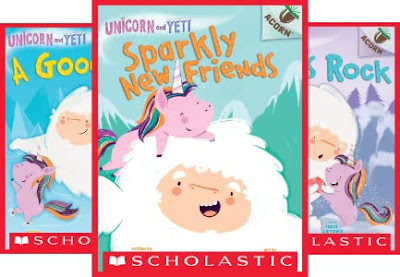
Unicorn and Yeti has been a newer addition to my classroom library, and it has been most appealing to girls. It is a graphic novel chapter book, which is really popular right now. The storyline is a little too simplistic to make it a favorite, but the readability and the pictures make it a great transition for lower level readers. It is not easy to find books at this level that are appealing for those readers just trying to master fluency by reading more text, so this is a series worth having for that transition.
Newest book in the series #6 Together to be published Feb. 1, 2022
Grade level: K - 2
Reading level: DRA - 16 - 18
Fountas & Pinnell - J
IRLA - 2B - 1R
Lexile - 300 - 380
King and Kayla
by Dori Hillestad Butler
King and Kayla is a great early-emergent chapter book written in the voice of King, the dog. While written for younger readers, it still has humor and an interesting twist when kids have to infer what King is thinking from his point of view as a dog. It also involves mysteries he has to solve, so it keeps things interesting. This is a series with a lot of sight word reading like Frog and Toad (some of those timeless classics), and Kayla is a person of color, which is always a nice addition to keep libraries diverse. It has been appealing to both boys and girls in my class because they love hearing King's voice in the story.
Newest book in the series: King & Kayla and the Case of the Lost Library Book (King & Kayla, 8) to be published Feb. 1, 2022
Grade level: 1 - 2
Reading level: DRA - 16 - 24
Fountas & Pinnell - L
IRLA - 1R
Lexile - 440L
Yasmin
by Saadia Faruqi
Yasmin books have been very popular with the girls in my class this year. Yasmin is a realistic fiction series with a Pakistani American girl who has adventures that are typical of most 1st and 2nd graders, which make her stories sweet and relatable. One of my favorite things about this series is that Yasmin is a typical second grade girl who is Muslim. Her religion does not play a role in the stories themselves; you just see it in the dynamic of her family. There are very few books in which our Muslim students get to see themselves, so I loved adding this diversity to my classroom library.
Newest book in the series: Yasmin the scientist published Jan. 1, 2021
Grade level: K - 3
Reading level: DRA - 14 - 16
Fountas & Pinnell - H - I
IRLA - 2B
Lexile - 500
Narwhal and Jelly
by Ben Clanton
If you have not yet discovered the joy of Narwhal and Jelly, it's time to check them out! These two ocean friends (a narwhal and a jellyfish) have very different personalities, but their silly adventures had my students–girls and boys alike– grabbing for these graphic novels. My students actually made a list of who got to read them next because they were in such high demand. Graphic novels are taking off like wildfire and getting kids reading for fun again. Check out this brochure from Harper Collins about why graphic novels are so powerful for our students.
Newest book in the series: Book #5 - Happy Narwhalidays, published September 8, 2020
Grade level: 1st - 4th
Reading level: DRA - 24
Fountas & Pinnell - L
IRLA - 2R
Lexile - 520
The Notebook of Doom and The Binder of Doom
by Troy Cummings
The Notebook of Doom series, which eventually becomes the Binder of Doom series, has become a recent favorite in my classroom. These mysteries are a little bit scary (but not really--very safe reads for 2nd graders) which makes them fun and silly mysteries for kids. Strange monsters are in this town, and the kids are the heroes as they take notes on the different monster mysteries they solve. This has been a favorite for both boys and girls. There are 13 books in the Notebook of Doom series and 4 in the Binder of Doom Series. I added a few here, but there are more.
Newest book in the series: #4 Binder of Doom Hydrant-Hydra published July 7, 2020
Grade level: 1 - 3
Reading level: DRA - 28 - 38
Fountas & Pinnell - M - P
IRLA - 2R - WH
Lexile - 460 - 510
Zoey and Sassafras
by Asia Citro
Zoey and Sassafras might be my favorite new series! Zoey, her mom (who is a scientist), and her cat, Sassafras, can see magical creatures. The animals come to them for help when they are sick or hurt. Written by a former science teacher, I LOVE how Zoey uses science, hypotheses, and experiments to solve problems. Because the creatures that need her help are magical, she has to be a creative problem solver. Whether doing research on different kinds of animals or conducting experiments to find the best solution, Zoey, with the help of her mom, cure these magical creatures. It's written in a kid-friendly way with science concepts that kids can try themselves. I love the STEM connections in this series, and I love that Zoey, the main character, is black. We need more books like this so kids of color see themselves in the stories they read.
Newest book in the series: #9 Wishypoofs and Hiccups to be published Oct. 26, 2021
Grade level: 1 - 4th
Reading level: DRA - 34
Fountas & Pinnell - O
IRLA - WH
Lexile - 600
The Bad Guys
by Aaron Blabey
The Bad Guys is another series of graphic novel favorites, especially for boys. Characters that usually play the bad guy in fairy tales such as the wolf, snake, shark, and piranha want to change their image and become good guys. They try to do good deeds, but not everyone is ready to see these bad guys as good! With a lot of silliness and 2nd/3rd grade boy humor, these bad guys set out on adventures to do good deeds. This series is also becoming a Dream Works animated movie, so it's a great opportunity to get them hooked!
Newest book in the series: #14 The Bad Guys in They're Bee-hind You! to be published Nov. 2, 2021
Grade level: 2 - 5
Reading level: DRA - 34 - 38
Fountas & Pinnell - P - Q
IRLA - WH
Lexile - 390 - 540
Dogman
By Dav Pilkey
Dogman. Is it silly? Yeah. A bit ridiculous? Uh huh. Does it make teachers kind of roll their eyes? Yup. Is it an absolute favorite action–adventure graphic novel, especially for boys? Definitely. The boys in my class could not get enough of Dogman this year. It does not have as much "potty humor" as Capitan Underpants (written by the same author), and if it makes kids excited to read, I'm okay with that! I want to instill a love of reading, and like it or not, this does the trick for a lot of our boys who are reluctant readers. It is dead-on boy humor.
Newest book in the series: #10 Mothering Heights published March 23, 2021
Grade level: 1 - 4th
Reading level: DRA - 38 - 40
Fountas & Pinnell - P - Q
IRLA - WH - BK
Lexile - 480
Who Would Win?
by Jerry Pallotta
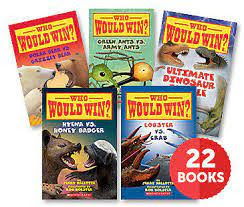
We always need to keep a balance of nonfiction books in our classroom libraries, and the Who Would Win? series is a huge hit! The idea of different animals battling each other is a big draw for students, especially boys. While most of the battles in these books are between animals that would never actually encounter each other in real life because they live in different parts of the world (which is explained in the text), it doesn't matter. It lays out stats on these animal like in video games and compares their strengths and weaknesses. I think that is the big draw for kids. And they get to read a lot of nonfiction text features and facts, so it is a win-win series to invest in! There are 25 books in this series, so I added just a few below.
Newest book in the series: #25 Walrus vs. Elephant Seal published Dec. 29, 2020
Grade level: 1 - 4th
Reading level: DRA - 34 - 40
Fountas & Pinnell - O - Q
IRLA - WH - BK
Lexile - 570 - 700
So as you are setting up your classroom for students to come back in person, try hooking them on a favorite series! We need to keep kids reading!
The 2nd edition of the Teacher Stuff for You Newsletter is ready! The theme of this newsletter is Bitmoji Mania. Click the picture to visit the live links. Use the arrow in the slide show to see the previous Newsletter. Enjoy!
No one knows exactly what school will look like in August yet, but there are a few things that we can do to get organized in the meantime. This series of blog posts called, "Getting Organized for #DistanceLearning" is full of tips that will be useful whether you're teaching online or face to face. So be sure to check back for all the tips in this series!
Google drive is our 21st century filing cabinet, so there is no need to have 2 or 3 filing cabinets in your classroom anymore–save your master copies virtually. This will allow you to access everything you have from home and assign it virtually if necessary. It is SO much easier to keep track of what you have in your filing cabinet when it's a digital copy. And you will want an organized google drive next year–trust me! We'll all be using more digital resources (like it or not). I am a google certified educator level 1 and 2, and I have a few tips to make organizing your google drive so much easier!
Folders in Google Drive
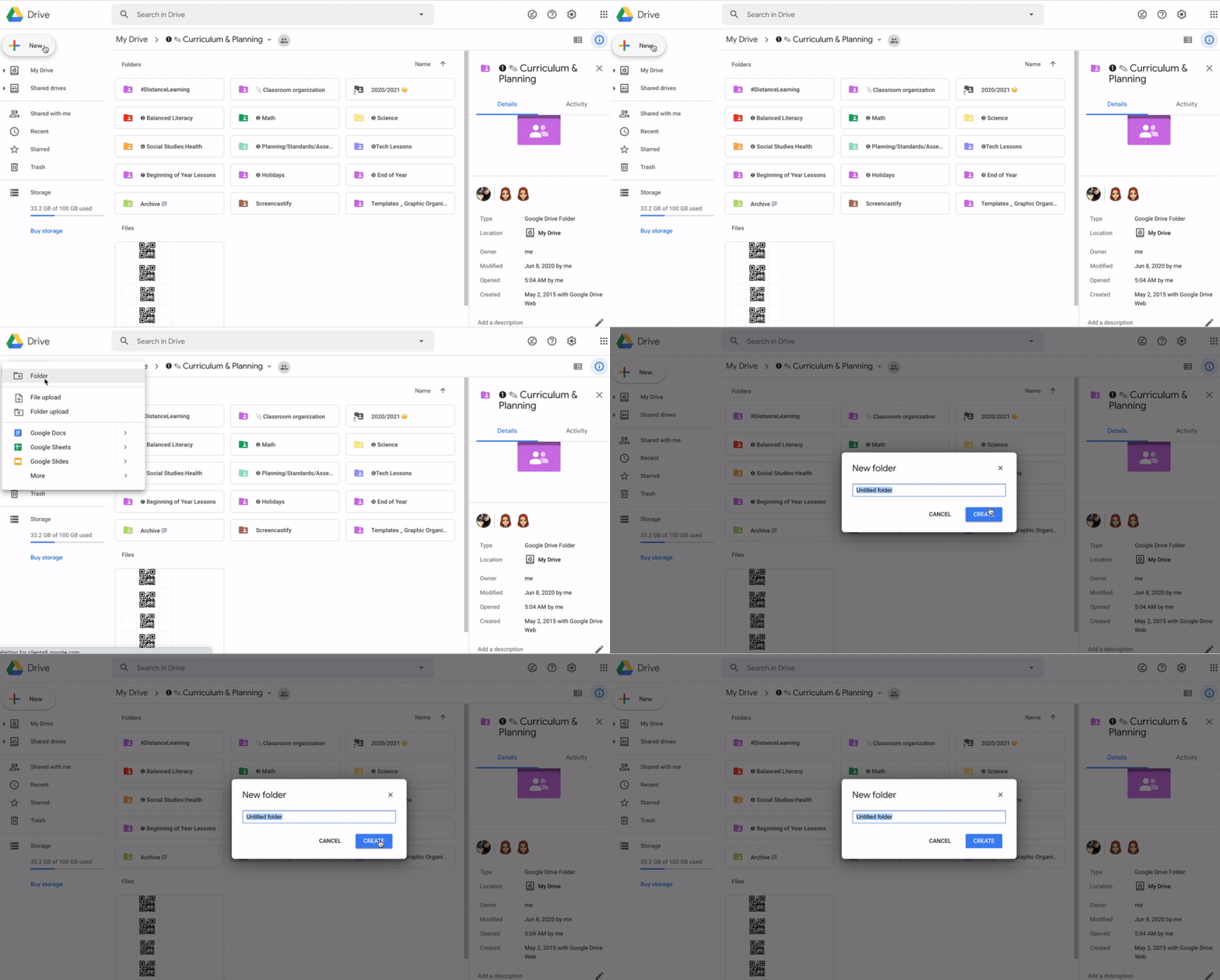
How to create a new folder in Google Drive: new–folder
First, if you haven't created folders in your google drive, that is the place to start. Click: new–folder. Just like you would in a metal filing cabinet, you can organize your files by subject. Then you can create folders inside folders to continue to organize your files. For example, I have a Balanced Literacy folder. Inside that folder, I have a folder for Comprehension, Read Aloud, Word Study, Conferring/Guided Reading, Shared Reading, and Writing. In my math folder, I have folders for each standard: Number and Quantity, Algebra and Functions, Data, Statistics & Probability, and Geometry. If I use a specific curriculum for any subject, I also create a folder it, i.e. Lucy Calkins Units of Study, or Bridges Math.
Once you have your files organized into folders, they will show up in alphabetical order. You can number your folders to reorder them in the order you want. Years ago, I learned this cool tip from Ladybug's Teacher Files. You can use https://www.copypastecharacter.com/numerals to give your numbered folders a sleeker look by copying and pasting their numbers in the name of your folders. You can use emojis and pictures too. Check out her original post from 2016 here: Color Code and Organize your google Drive.
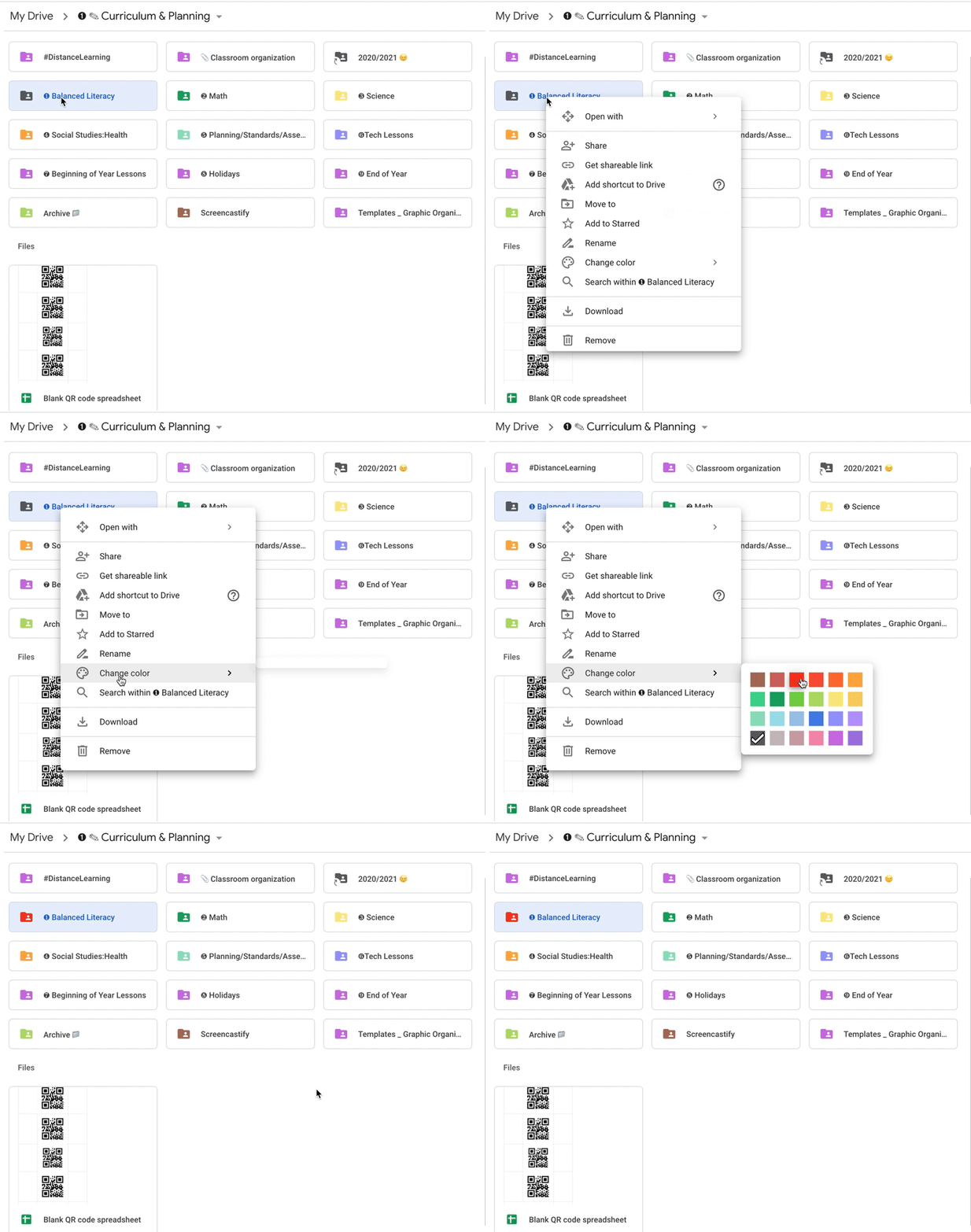
How to change the color of your google drive folders: Right click on the folder–go down to 'change color'
Next, I color-coded my folders in google drive to match the same colors I use in the classroom: red = literacy, blue = writing, green = math, yellow = science, orange = social studies. This helps me visually organize subjects. Just right click on the folder and go down to 'change color.'
#Hashtags and Shortcuts
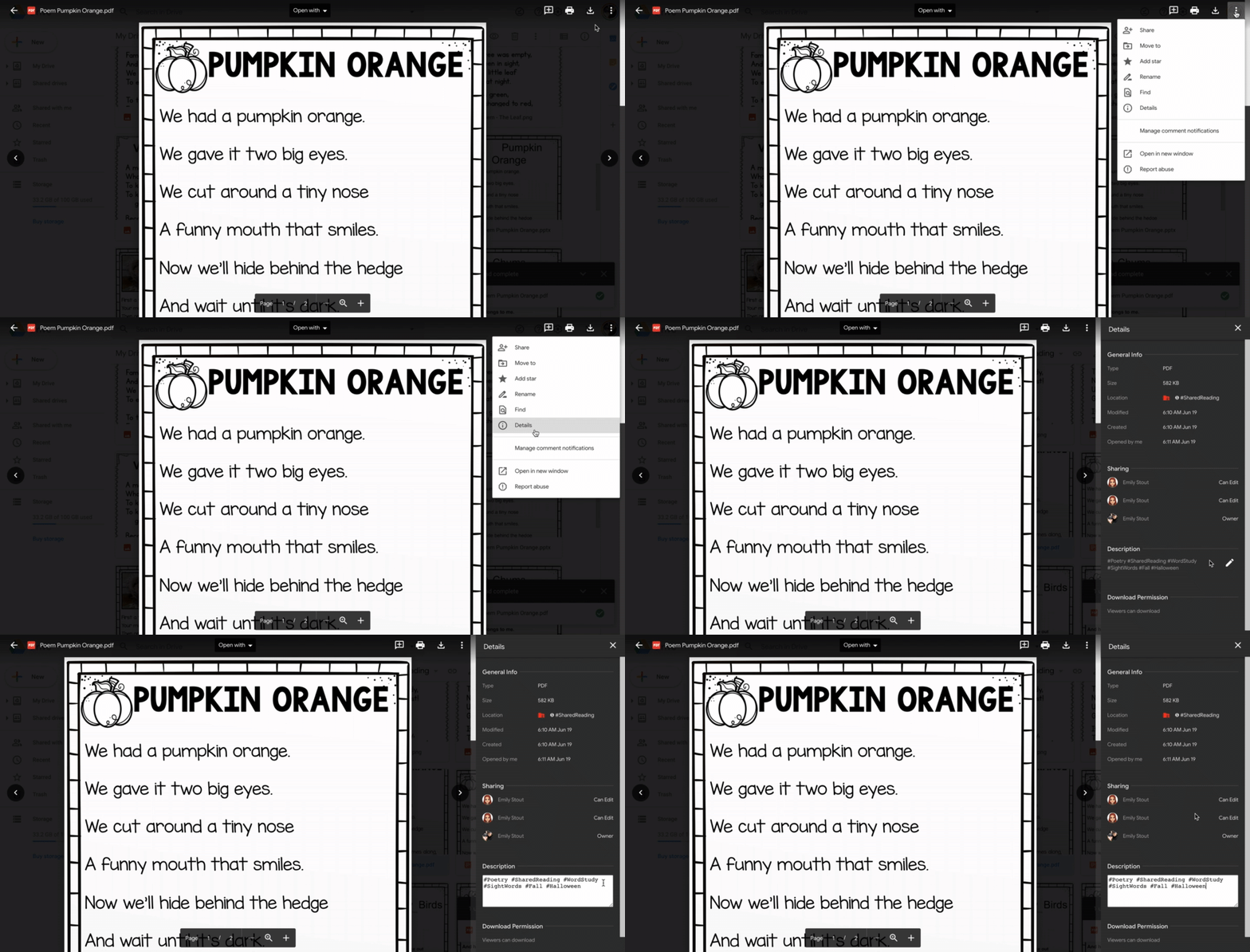
Add hashtags to the file description when the file fits in more than one category: click on the file–3 dots in the corner–details–pencil under description
Are you ready to take your google drive organization up a notch? Try #hashtags! I got this idea from Shake Up Learning. She has 13 Tips to Organize Your Google Drive that you can check out. The one that was new for me was adding descriptions to my folders in google drive using hashtags. This is really helpful when I have a file that I could put in more than one place. For example, I use a lot of poems during shared reading. This poem fits in the categories #Poetry #SharedReading #WordStudy #SightWords #Fall #Halloween. If I click on my poem and click on the 3 dots, click details, and click on the pencil under description, I can use all those hashtag labels to describe this file. Then, when I am planning for fall activities, I can type in #Fall in the Google Drive search bar. Anything I labeled with #Fall will pull up in the search no matter which folder I stored it in. Super helpful and easy!
How to add a file shortcut to another folder: right click on file–add shortcut to drive–choose folder in google drive to add it to
In March 2020, google came out with a new update, 'add shortcut to google drive', that has been especially handy if you create and share teacher resources on a platform like Teachers Pay Teachers or Teacher Sherpa. I keep the teacher resources that I create in a separate folder instead of mixing them into my Google Drive teacher files. However, with the 'add shortcut to google drive' option, now I can add it to my personal files! For example, I created this 1G Power Words Sticker Book. I keep it in my folder of resources that I sell. But now I right click on that resource, click on 'add shortcut to drive', click on the folder in my google drive where I would use that resource, and now it lives in 2 places. Then I can see it in my teacher files when I'm planning, and I don't have to try to remember what I have.
I'm switching school districts this coming school year, and my big project this summer is organizing my google drive. You may already know that if you have a google account through a school district, anything owned by that account in google drive will disappear when they delete your account. Unfortunately, you cannot change ownership to your personal google drive because it will not allow ownership change outside of your organization. So now what? Apparently I have not paid attention to whether I created things with my personal google drive or my school google drive, so I have stuff all over the place! Here is a blog post that shares how to save everything in your school google drive account so you can transfer it to a new account: http://techtips-ccsd.blogspot.com/2015/05/tuesday-tech-tip-taking-it-with-you.html
These are the tips I'm using to organize my google drive this summer, and I hope you find them helpful too! Don't forget to check back next week for more tips. If you haven't seen the other tips in this blog series yet, make sure to go back and check out tip #1: Password Saver and tip #2: Lesson Plan Templates and Hyperlinks.
No one knows exactly what school will look like in August yet, but there are a few things that we can do to get organized in the meantime. This series of blog posts called, "Getting Organized for #DistanceLearning" is full of tips that will be useful whether you're teaching online or face to face. So be sure to check back for all the tips in this series!
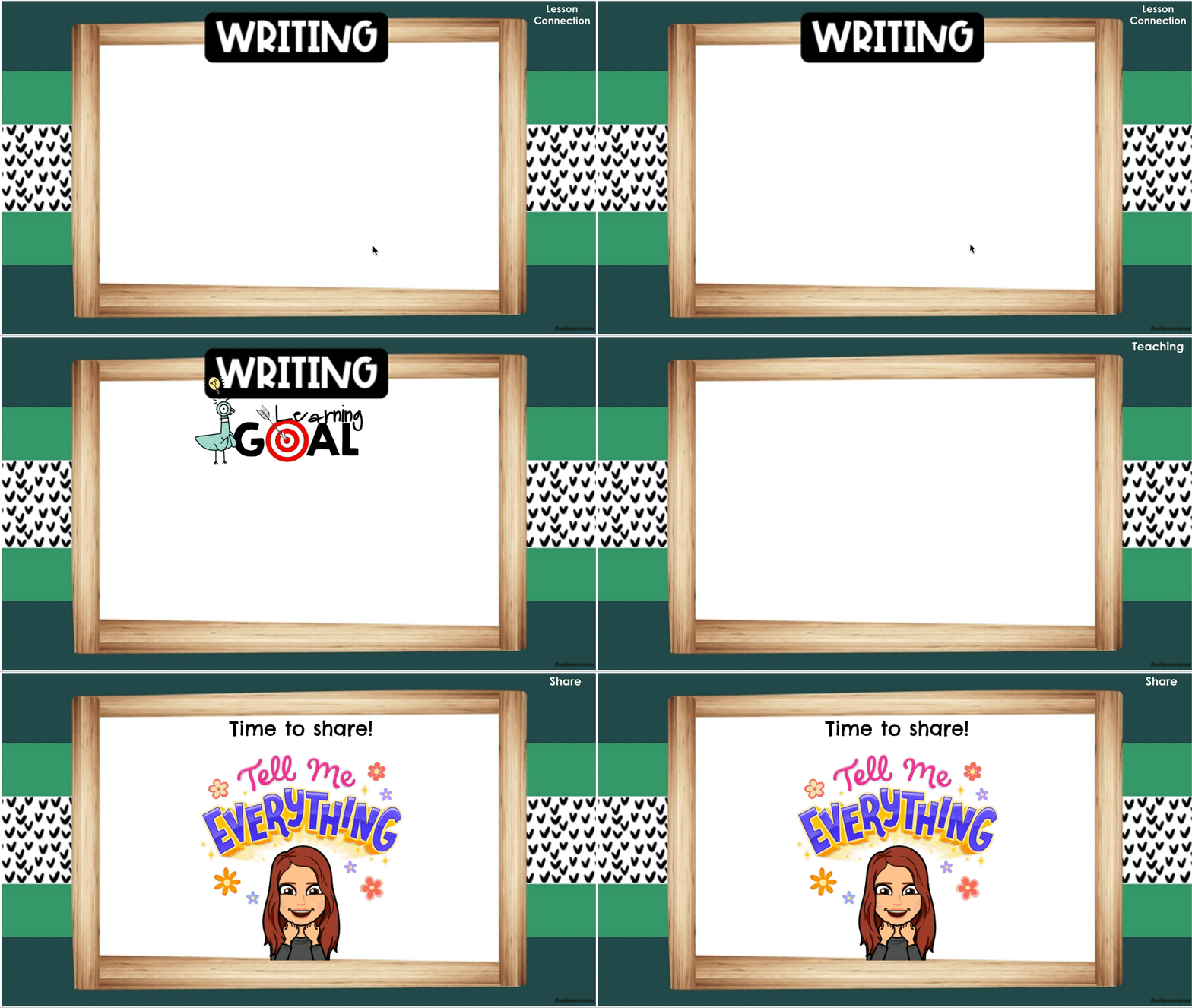
I'm really excited to share with you this efficient way to organize and access lesson plans! Whether we are teaching face to face, online, or a combination of both, creating a lesson plan template for each subject is going to save you time and create a learning routine that is more predictable for kids. Every lesson usually has a similar format – a connection or hook, a teaching point, some modeling, guided practice, independent practice, and sharing. First, start by creating a blank template in google slides for each subject with at least one slide for each part of the lesson. You can see my blank template for writing above. This will make your lesson planning much quicker. Having a slide that names the teaching point in the same way each time (mine says "Learning Goal" and has the picture of the Pigeon) will help students tune into the teaching point when they know where to look for it. If you use Lucy Calkins Units of Study in any subject, your teaching point is the sticky note! You can see mine on the writing slide. Because the language she uses for her teaching point is usually so wordy, you can see I typed it into the notes section of the slide. That way I can still share her teaching point with fidelity, but I don't have to read it out of the book or have kids worry about a bunch of text on the slide. The sticky note focuses them on the teaching point while I still share the exact language. You can even get started on your lesson planning for the year this summer. If you have a curriculum you follow, you can make a slideshow for each lesson and plug in the teaching point or learning goal right now like in the examples above. Leave the rest blank for now so you can plan it as you go. You can even use the same slides each year and just make adjustments as needed. The big idea will already be there! I'm using the templates created by Ashley McKenzie called Scandi Mountains. She has a lot of cute designs! If you're looking for some free templates, there are a lot out there. Some of my favorite free templates are from Slides Carnival.
Hyperdocs
Google doc hyperlink page
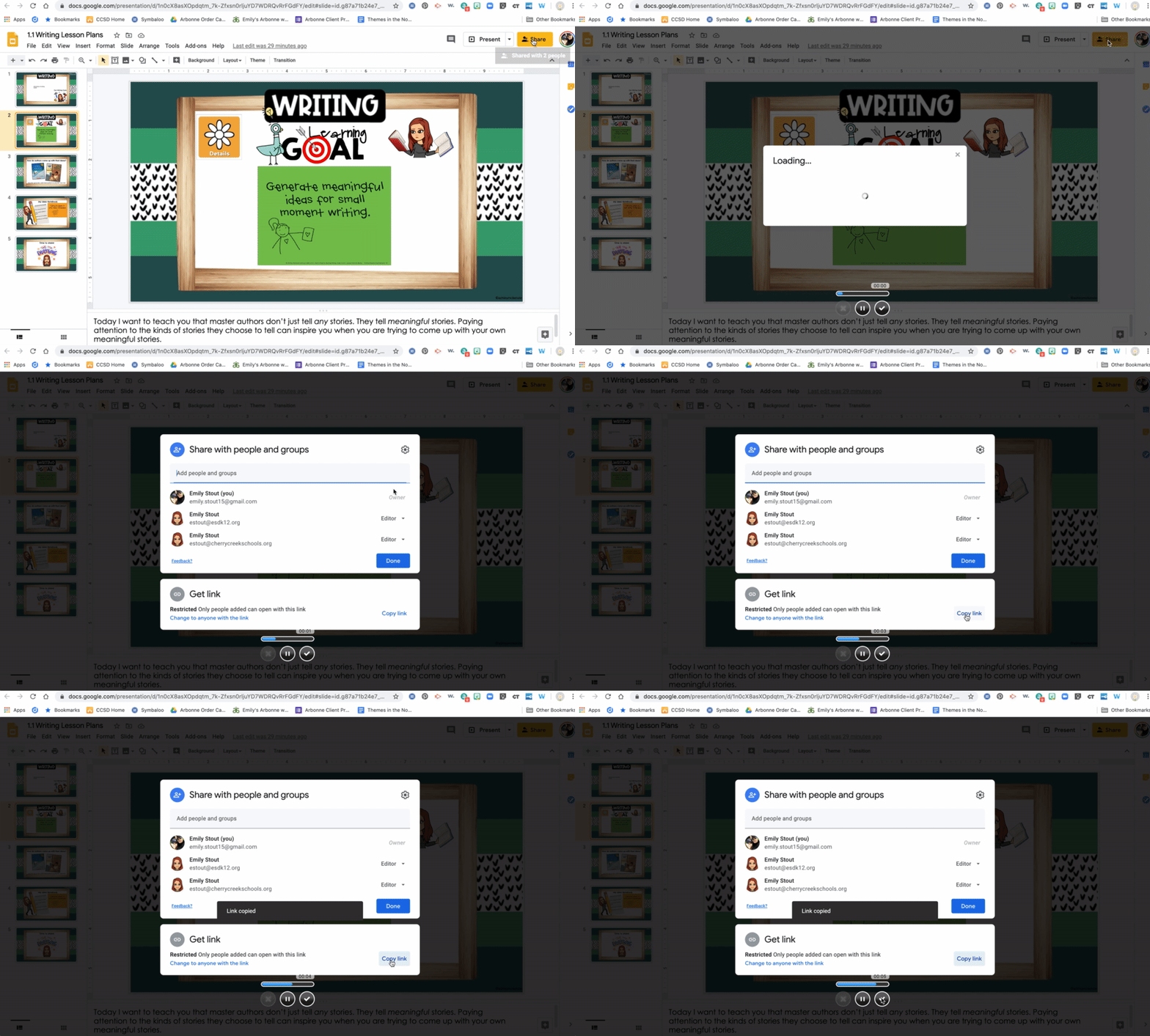
How to copy the link from your google slide lesson plan: share–copy link
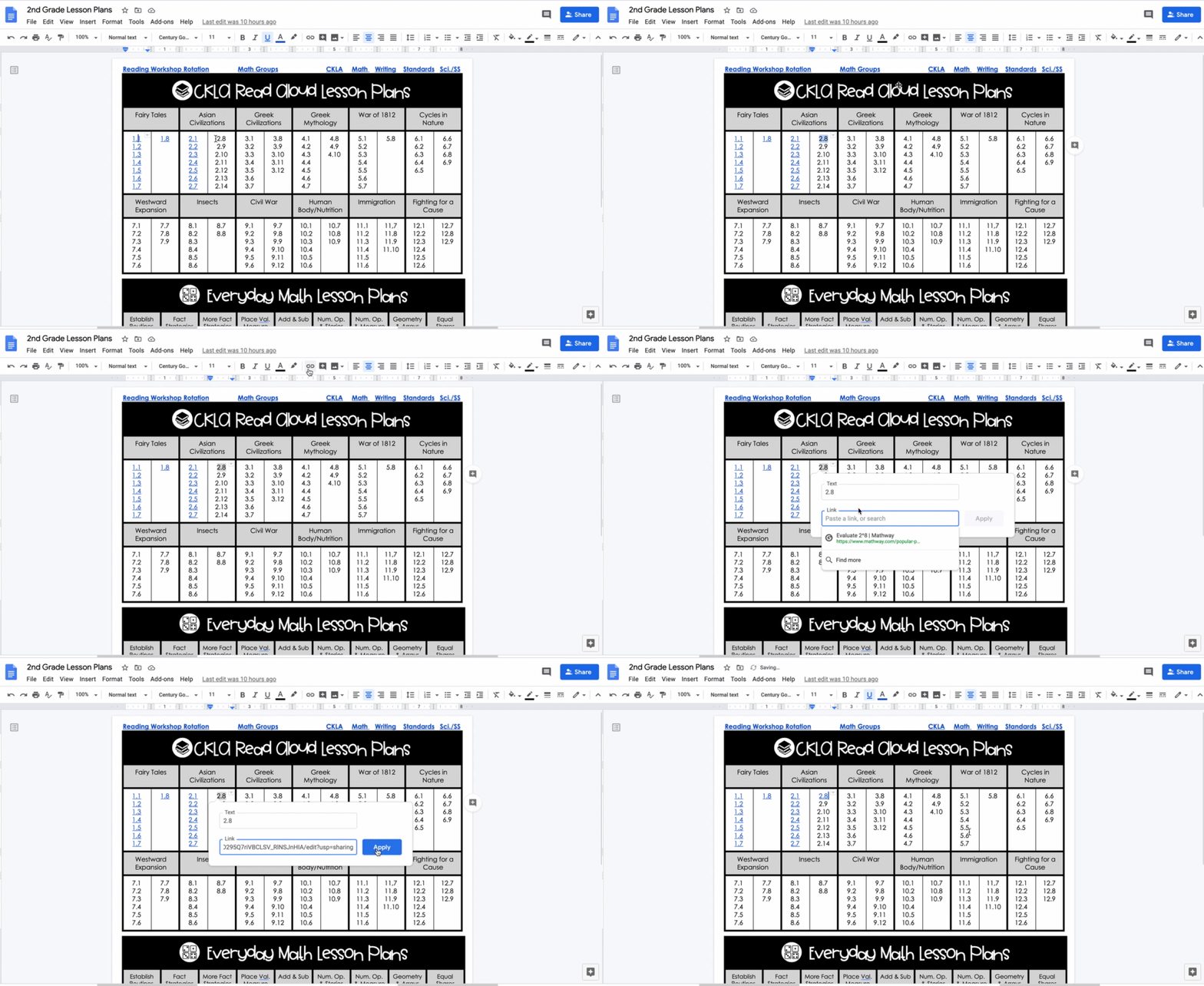
How to add the link from your lesson plan to your google doc hyperlink: highlight the lesson plan number–click on the picture of the link–paste the link–apply
Once you have a bunch of google slides lessons created, you need to be able to get to them quickly and efficiently. That's where hyperdocs come in! A hyperdoc is basically a google doc that holds a bunch of links that are part of a common theme. My school (which will be new for me next year) has a curriculum for reading, writing, and math. I created a google doc with each of those subjects (above), and I added the lesson number in each table. For example, 1.1 is unit 1, lesson 1. When I have a google slide lesson plan created, I link it to the correct lesson number. First click "share" on your google slide lesson plan and copy the link (see example above). Then highlight the lesson plan number on the google doc, click on the picture of the link, and paste the link you copied from the lesson (see the example above). That's it! Your lesson plans are now all in one place.
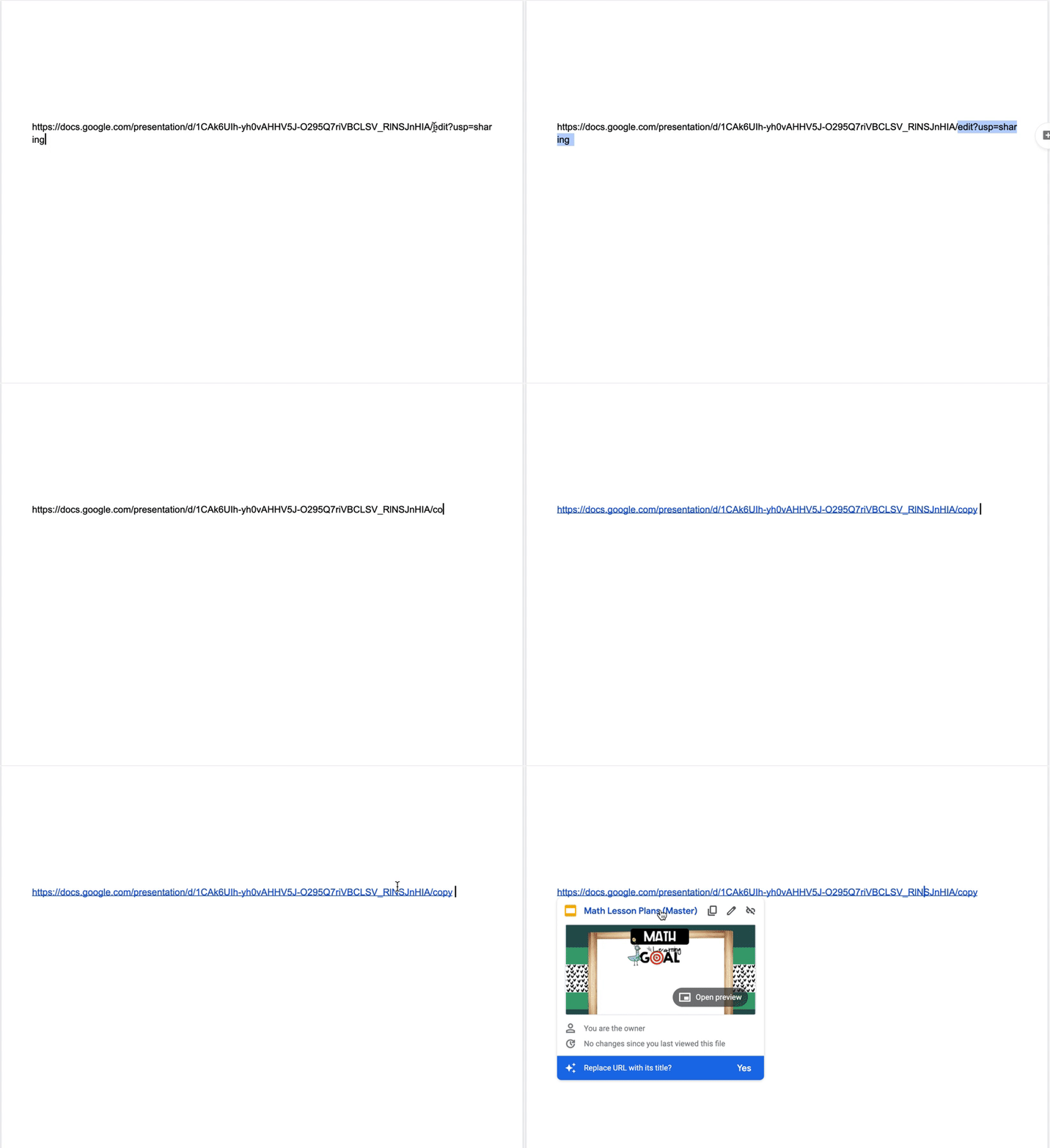
How to change a link so it automatically make a copy when you click on it: in the link, delete "edit" (and anything that comes after it)–type in "copy"
I also linked the blank lesson plan template for each subject at the top of my google doc hyperlink page. This saves me time when I am ready to create a new lesson plan. I created the link to automatically make a copy of the blank lesson plan template when I click on it. To do this, just copy the link of the google slide template (see the hyperlinks example again) and change the last part of the url that begins with /edit to the word copy (see the example above), and paste the new link to your google doc hyperlink page. Then when you click on it, it will automatically make a copy of your blank lesson plan template so you can start working on your next lesson plan. Nice and efficient!
I also have my reader's workshop rotation and math groups on google slides, which I linked to my google doc hyperlink page too. I just project the groups and rotations during workshop time, and it's easy to change as needed when it's a google slide. I also linked the standards to my google doc hyperlink page because I often need to refer to them when I am planning. That makes everything I need for my lesson plan in one spot. Perfect!
Bookmarks
Symbaloo bookmark page
Now that everything digital you need to teach your lessons all year is linked on one page, I still have one more shortcut that will make your life easier. Have you ever used Symbaloo? It is a free bookmark tool that is saved in the cloud, so you can access your bookmarks on any device. I have my computer set up so that when I log onto the internet, my symbaloo page (above) automatically pops up and all my bookmarks are automatically at my fingertips. You can choose the color and picture for each bookmark you save. One of the really convenient things about symbaloo is that you can also bookmark a google doc, a google slide, etc. That means I can copy the link to my google doc hyperlink page and create a bookmark that will open that doc for me. (tip: when creating that bookmark, save it as a website instead of embedding it in symbaloo, and it will open the whole doc.) The picture of the target on the picture above is my google doc hyperlink page. That means whether we're teaching face to face or remotely next year, with one click, I'm ready!
I hope you found this tip for Getting Organized for #DistanceLearning helpful! Check back next week for tips on organizing your google drive. If you haven't seen the other tips in this blog series yet, make sure to go back and check out tip #1: Password Saver.